예외 처리 방식
try {
const apiResponse = await fetch(API_URL, {
method: 'POST',
headers: { 'Content-Type': 'application/json' },
body: JSON.stringify({ contents }),
});
개발을 할 때 오류가 많이 발생하는데
보통 자바스크립트는 에러가 발생해도 어디서 구체적으로 발생한 것인지 알기 어려울 때가 많아서
예외 처리 구문을 사용하여 에러 발생 위치를 잡는다.
Try/Catch 사용 방법
try { 구문 } 안에 catch를 넣어서 try 블록에서 예외가 발생하며 잡아내는 역할을 한다.
try
{
const apiResponse = await fetch(API_URL, {
method: 'POST',
headers: { 'Content-Type': 'application/json' },
body: JSON.stringify({ contents }),
});
// 구글 측 에러 처리
if (!apiResponse.ok)
{
const errorData = await apiResponse.json();
console.error('🔥 Google API 에러 발생:', JSON.stringify(errorData, null, 2));
return res.status(apiResponse.status).json({
error: 'Gemini API 호출 실패',
details: errorData.error?.message || '알 수 없는 오류'
});
}
const data = await apiResponse.json();
const aiResponseText = data.candidates[0].content.parts[0].text;
console.log('✅ Gemini 응답 성공');
res.status(200).json({ response: aiResponseText });
}
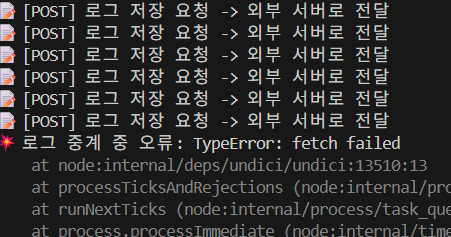
해커톤 때 ai를 사용하였는데 오류가 생기면
빠르게 서버 터미널에 나오는 json을 ai한테 보내고 오류를 잡았다.
// 3. 데이터 가공 (Google 규격에 맞게 변환)
// system 역할은 지원하지 않는 경우가 많아 user로 치환
const contents = history.map(msg => ({
role: msg.role === 'system' ? 'user' : msg.role,
parts: [{ text: msg.content }]
}));
history는 배열인데 지금까지 대화 목록이 담겨 있다
{ "role": "user",
"content": "안녕?"
}
일반적인 json은 이렇게 보낸다.
{
"role": "user",
"parts": [
{
"text": "안녕?"
}
]
}
Gemini 한테 내용을 보낼 때 parts 가 추가된다.
// Google Gemini API 호출
try
{
const apiResponse = await fetch(API_URL, {
method: 'POST',
headers: { 'Content-Type': 'application/json' },
body: JSON.stringify({ contents }),
});
// 구글 측 에러 처리
if (!apiResponse.ok) {
const errorData = await apiResponse.json();
console.error('🔥 Google API 에러 발생:', JSON.stringify(errorData, null, 2));
return res.status(apiResponse.status).json({
error: 'Gemini API 호출 실패',
details: errorData.error?.message || '알 수 없는 오류'
});
}
1. AI 채팅 API (POST /api/chat)
- 용도: 프론트엔드 대신 Google Gemini에게 질문을 전달하고 답변을 받아옴 (API Key 보안).
- 사용법 (Frontend):
const response = await fetch('/api/chat', { method: 'POST', headers: { 'Content-Type': 'application/json' }, body: JSON.stringify({ history: [ { role: 'user', content: '안녕' }, { role: 'model', content: '반가워요' }, { role: 'user', content: '햄버거 추천해줘' } ] }) }); const data = await response.json(); console.log(data.response); // AI의 답변 출력 - 주의사항: history 배열 필수 (과거 대화 맥락 유지용).
2. 로그 저장 API (POST /api/event-logs/events)
- 용도: 사용자의 클릭, 터치 등 행동 로그를 외부 백엔드 서버로 전달하여 저장.
- 사용법 (Frontend):
await fetch('/api/event-logs/events', {
  method: 'POST',
  headers: { 'Content-Type': 'application/json' },
  body: JSON.stringify({
    eventType: 'click',
    x: 100,
    y: 200,
    timestamp: Date.now()
  })
});
3. 클릭 좌표 조회 API (GET /api/event-logs/click)
- 용도: 특정 페이지(pageNum)의 클릭 좌표 데이터를 외부 서버에서 가져옴 (히트맵 그릴 때 사용).
- 사용법 (Frontend):
-
// pageNum=1 인 페이지의 데이터 요청 const res = await fetch('/api/event-logs/click?pageNum=1'); const data = await res.json(); // data: [{x: 50, y: 50}, {x: 120, y: 30}, ...] - JavaScript
4. 체류 시간 조회 API (GET /api/event-logs/times/average)
- 용도: 사용자가 특정 페이지에 머문 평균 시간을 외부 서버에서 가져옴.
- 사용법 (Frontend):
JavaScript
const res = await fetch('/api/event-logs/times/average?pageNum=1');
const data = await res.json();
console.log(data); // 예: { averageTime: 4.5 } (초 단위)
'Front_end' 카테고리의 다른 글
| TypeScript (0) | 2026.05.06 |
|---|---|
| 강의 자료 2 (0) | 2026.02.25 |
| React 개발자를 위한 가장 쉬운 Node.js 백엔드 연동 가이드 (0) | 2025.11.03 |
| ☁️구름톤 자바스크립트 기초 정리 (0) | 2025.05.03 |
| 구름톤 ☁️ 자바스크립트,css 기초 개념정리 (0) | 2025.04.12 |